Cindy Rogers

Hotel UX
Showcasing the UX process
A project to create an online booking experience that is simple, accessible and based on a deep understanding of the hotel's target users.

Problem to solve
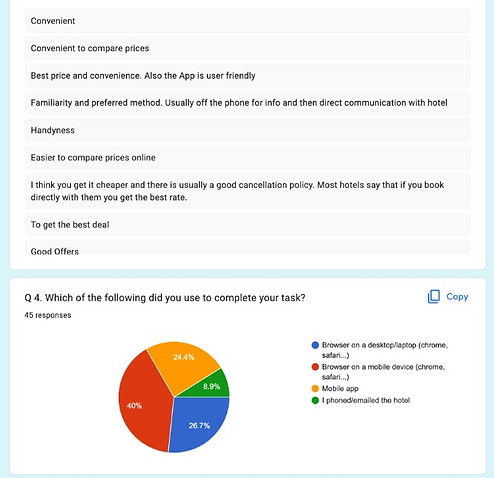
To remove friction when making a booking on a hotel mobile site. During my research, I discovered that 40% of users still use hotel websites to make online bookings. Some utilise searches from aggregator sites and compare the prices to get the best deal.
Research
-
Competitor analysis
-
Survey
-
A/B comparative usability test
Define
-
Afinity diagram
-
Customer journey
Design
-
Flow diagram
-
Wireframe sketches
Test
-
Clickable prototype
Build
-
Anotated wireframes
Research
I began by researching 4 competitors to explore what works and what doesn't work well in hotel booking sites.
Along with the competitor analysis, I conducted a survey with 45 participants. My research highlighted that users tend not to download hotel apps but rather book via the hotel's website or a hotel aggregator site using their mobile or desktop browser. Another insight told me that aggregator sites are used to find good deals but then users often go to the hotel website to compare prices and see can a better deal be found. This led me to focus on making a responsive mobile site rather than a native mobile app.
I also carried out an A/B comparative usability test to gather deeper insights. Things like good photographs, location and breakfast came through as key elements in the decision-making process. As well as few and clear special offers work better rather than showcasing lots deals, as it can lead to choice overload and acts as a barrier to completing the booking.
Below are some screenshots of the methods used in my process.


This is a bit more complicated, there's too much information in it. It wasn't as simple as the last site to book.
Participant
Fiona


Define
To analyse the data gathered I used an affinity diagram. Using colour-coded post-its on a wall. Each colour represented a stream of research. For example, pink consisted of data gathered from the A/B comparative usability test.
The various insights were gathered and synthesised using 1 or 2 passes, before moving on to group the findings to explore patterns emerging. This was followed by a customer journey map to pinpoint where in the user journey needs improvement.


Design
The next step in the process was the design. I began with sketches on paper to work out the interaction and what screens would be needed.
I first sketched a high-level overview of a flow for a happy path in the hotel booking process. Then I began to sketch again taking a closer look at each screen. I iterated on this a couple of times and then began the flow diagram to capture each interaction and screen state in the happy path flow.


Test
Once I felt I'd worked out the screens and interaction required I began wireframing using Figma so that I could test the flow.
I created a clickable prototype by linking the screens together using Figma so that the interaction and screen states could be tested. Once testing was complete I annotated the wireframes for handover to developers.


